- Sep
- Threads
- 4
- 202
- 10
- 18
AD: Mt2009 - Mobile & PC - 30 January 2026 CHECK THE PRESENTATION!

Hello,
My nick is pcb.is.good!
As shown before:
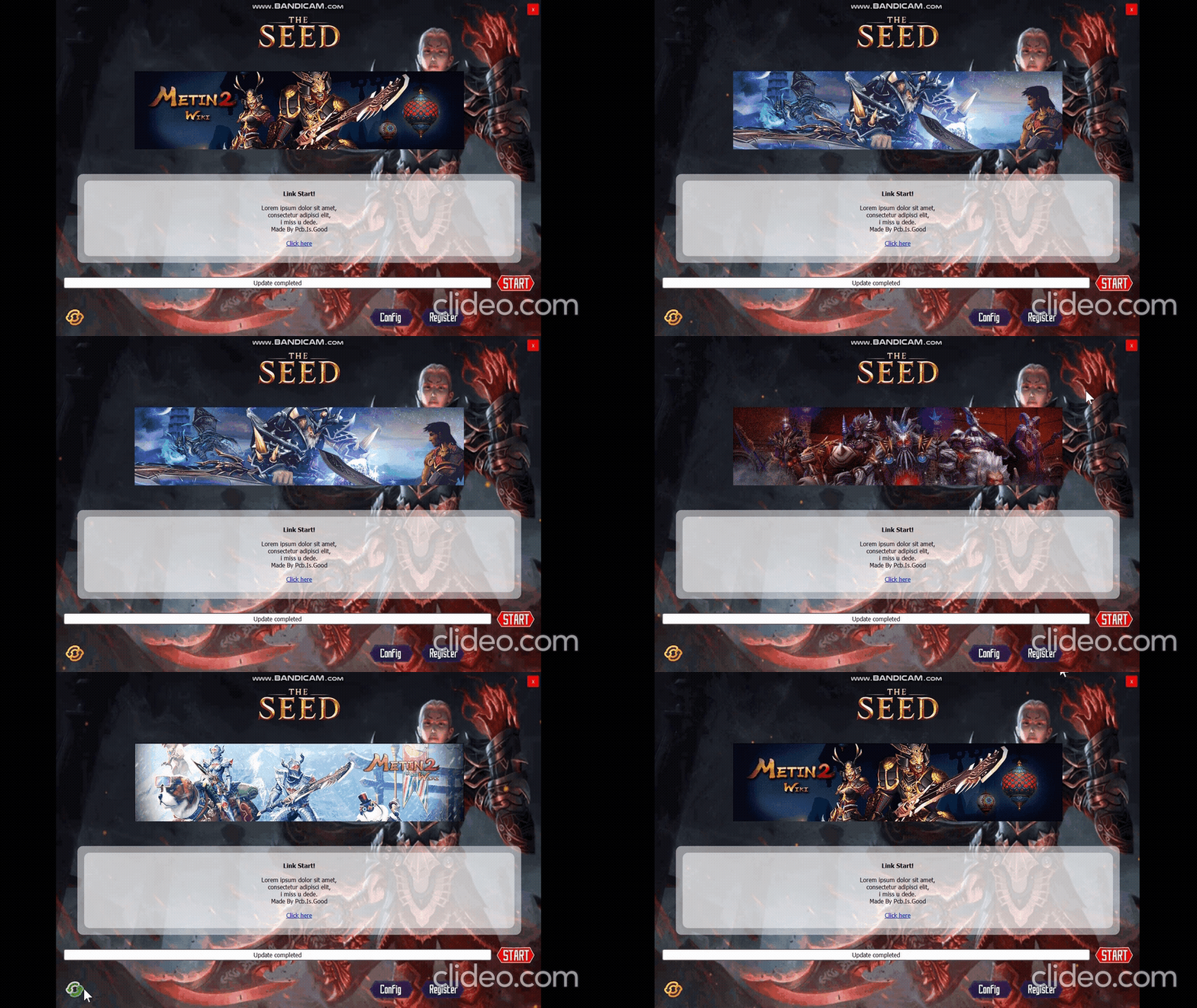
[ Preview ] AutoPatcher v1.0 (Python Src Fully Customizable)
Today I release the updated tool

There are many solutions available on the forum, but in my opinion, they tend to be too complex.
I also wanted to use this opportunity to practice and improve my skills.
This tool isn't intended for general end-user use though with a few enhancements, it could be,
but it was specifically developed for my beta testers.
My goal is to make it the best free alternative out there for beta phase.
Preview:
(
To see the download links,
Log in or register now.
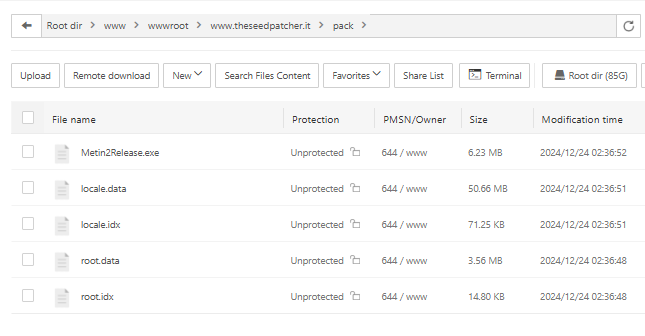
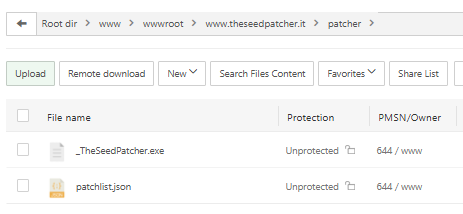
, idk why is broken)Tutorial:




JSON:
[/CENTER]
{
    "patch_1.5": [
        {
            "afterdeath_shield": {
                "path": "afterdeath_shield",
                "hash": "bb6e1278e27fb9bf1753c260b8e97f03d6ceaebcb7618515a456dd07196aefe9",
                "size": 1003692
            },
            "assets": {
                "path": "assets",
                "hash": "960fd41ad960e3a7db1d2109d50a69c5e8ed0a8bf33554027ff2a212fce00dfb",
                "size": 12741
            },
            "bgm": {
                "path": "bgm",
                "hash": "0aad38d9f89deafaf4c5fdbd5633e63d0059dc2d4bd8c357d8f5f3a254b31605",
                "size": 11422612
            }
        }
    ],
    "exe": {
        "_TheSeed.exe": {
            "path": "_TheSeed.exe",
            "hash": "de21f5bd23bc66bad22317c7fe6dd96af0567b14d05df0d8141f0e3463b8c72a",
            "size": 3841024
        }
    },
    "patcher": {
        "name": "_TheSeedPatcher.exe",
        "hash": "c36552116bee1373be5e45c9e29f159f0c04c60547454df05cbcb45df145183b",
        "size": 115488496,
        "path": "C:/Users/Yomi/Desktop/System/Tool/Patcher/TheSeedPatcher/PatchList Maker/update\\patcher\\_TheSeedPatcher.exe"
    }
}
[CENTER]
The patcher operates by connecting to a server to download a patchlist, which contains the version numbers and file hashes of the latest updates.
Then compares these details with the version numbers and hashes of the files present in the client, If discrepancies are found either in the version numbers or file hashes the patcher automatically downloads the necessary updated files from the server to ensure the client is up- to-date.
The patcher has a feature to check for updates to itself, download the update, and restart with the latest version.
I also developed a script that processes the files inside the update folder.
It calculates their size and hash values and then generates a JSON file, which is ready to be uploaded to the server for managing updates efficiently.
Example of config.py
Code:
[/CENTER]

### made by pcb.is.good [25.12.2024] ??????????? ###
### General Config ###
patcher_title = "The Seed Patcher v1.0"
patcher_name = "_TheSeedPatcher.exe"
exe_name = "_TheSeed.exe"
config_exe_name = "./" + "config.exe"
pack_path = "pack"
version_file_name = "version.pkl" # DO NOT TOUCH
arguments = "--4Hby^^Z5R321##!nXe9H6&GFyDDMG*!#"
updater_patch = "worker.exe" # DO NOT TOUCH (is autopatcher for autopatcher)
auto_updater = True # True if u wanna start check at startup
### Link ###
patcher_folder = "https://www.theseedpatcher.it/patcher/"
patcher_url = patcher_folder + patcher_name # DO NOT TOUCH
patchlist_url = "http://www.theseedpatcher.it/patcher/patchlist.json"
pack_url = "http://www.theseedpatcher.it/pack"
register_url = "https://www.theseedpatcher.it/register.html"
### Image ###
logo_path = "images/logo.png"
#background_image_path = "images/background.png"
background_image_path = "images/background.gif"
icon_path = "images/icon.png"
### .gif or .png  !! Width (px): 880 Height (px):227
slide1 = "images/item_shop1.gif"
slide1url = 'https://www.youtube.com'
slide2 = "images/item_shop2.gif"
slide2url = 'https://www.youtube.com'
slide3 = "images/item_shop3.gif"
slide3url = 'https://www.youtube.com'
slide4 = "images/item_shop4.gif"
slide4url = 'https://www.youtube.com'
register_button_image = "images/button3.png"
config_button_image = "images/button2.png"
start_button_image = "images/start.png"
update_image_button = "images/update.png"
### Text ###
walltext = """<b>Link Start!</b><br><br>
Lorem ipsum dolor sit amet,<br>
consectetur adipisci elit,<br>
i miss u dede.<br>
Made By Pcb.Is.Good<br><br>
<a href="https://www.example.com">Click here</a>"""
update_complete = "Update completed"
downloading_text = "Downloading"
[CENTER]
Code:
[/CENTER]
### FTP ###
update_directory = "./update"
ftp_server = "192.14.8.127" # not need protocol and ports
ftp_user = "ftp_user"
ftp_password = "ftp_password"
### Patcher Config ###
patcher_title = "The Seed Patcher v1.27"
patcher_name = "_TheSeedPatcher.exe"
exe_name = "TheSeed.exe"
server_pack_folder = "pack"
patcher_path = "patcher"
### Images ###
icon_path = "images/icon.ico"
logo_path = "images/logo.png"
select_btn = "images/select.png"
upload_btn = "images/upload.png"
### Text ###
app_title = "Patch Maker"
[CENTER]
-------------------------

It has been compiled into an executable (.exe) and is fully customizable.


There are definitely more professional tools, but this is simple and super fast to set up,
great for beta phases or to keep the server updated for friends.
----------------------
README.txt
Code:
### Thank you for downloading my patcher! ###
### made by pcb.is.good [25.12.2024] ??????????? ###
## I have included comments and debug prints in case anyone encounters issues
# (these will not be visible once compiled into an .exe file).
# The patcher uses pickle instead txt for the client version, making it harder for players to edit.
# The patchlist is managed using JSON, ensuring everything is more organized.
# For the background and banners, both static images and GIFs can be used.

### PATCHER ###

The patcher consists of 3.py files, 1 file.exe and 1 folder:

images (folder):
Contains all the images that will make up the GUI.

main.py:
Contains the main logic of the code.

gui.py:
Primarily contains instructions for the graphical interface and its updates.

config.py:
Contains all the customizable variables within the patcher.
    _If you're not confident with Python, it's recommended not to modify variables that aren't found within this file_

worker.exe:
Is the self check update/upgrade (nested inside the main.exe)

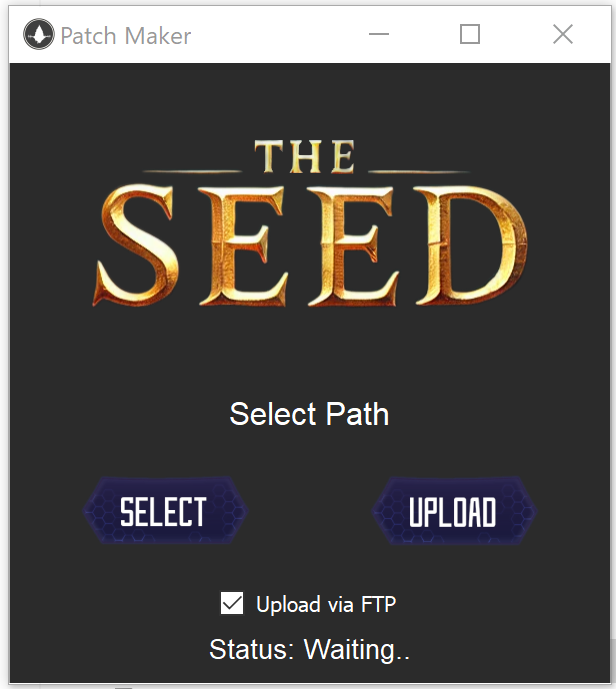
### PatchList.json MAKER ###
Additionally, a handy patchlist maker is provided:
You can select the folder containing the updated files (patcher included),
The tool automatically calculates the size and hash of updated files, storing them in patchlist.json.
After configuring FTP credentials in config.py (facoltative),
it uploads the updated files and the patch list to the specified folder on the web server.

patcherlist_maker.py:
Contains the code that generates the "Patchlist.json" by calculating hashes and sizes, indicating the patch version.

config.py:
Contains all the customizable variables within the patcher.
    _If you're not confident with Python, it's recommended not to modify variables that aren't found within this file_

update (folder):
Contains the updated .eix/.epk* files to build the patchlist.

patchlist.json:
Contains the generated patchlist.

version.json:
Tracks the generated versions.


### SERVERSIDE ###

In the root of your webserver, you will also need to create two folders:

pack (folder):
This folder should contain the updated .eix/.epk* files to be downloaded.
(the same files as in the "update" folder of the patcherlist maker).

patcher (folder):
This folder will contain the "patcherlist.json" file and,
the update for the patcher itself (if is needed).


### How To Distribute ###

Python is not required for the end user's PC to run the program,
but it is necessary for compiling the executable (.exe) and for distribution.

Therefore, we need to install the following packages within our environment:
(a virtual environment is fine)

PyQt5==5.15.9
urllib3==1.26.6
configparser==5.3.0
auto-py-to-exe==2.29.0
requests==2.31.0

To install these dependencies you can open the console and Run the following command to install the packages:
(by holding Shift and right-clicking to open it, or by navigating to the directory using the cd command).

pip install -r requirements.txt

Once this is done, open the console again and run:

auto-py-to-exe

This will open a Chrome-like window where you need to configure a few settings:

Script location:
Set this to main.py.

OneFile:
Choose "One File" to bundle everything into a single .exe file.

Console Window:
Set this to "Windows Based" (to hide the console).

Icon:
Set the icon to images/icon.ico.

Additional Files:
Add the images folder by clicking "Add folder" and then selecting all the images inside using "Add File".

Finally, press the button to compile the .exe.

at the end of the process by clicking on "open output folder"
(or entering the dist folder)
the main.exe file will be present which will be the patcher ready for distribution.

### Bug ###

contact me on discord #pcb.is.good
Size of Patcher.rar: 13.5MB
Size of Autopatcher.exe: 110MB
The download does not require any reactions or comments,
As I want to keep it open for anyone who encounters issues or wishes to leave genuine feedback.
The code is not precompiled because Python is open source, and I’ve kept it this way to allow anyone to review the code for security purposes (and also to see all the 'shitty' code I wrote
 )
)(Check the YouTube video or the README.txt file for instructions.)

I would like to give one final thanks to Tarata for being my tester and helping me find bugs.
I would also be happy to see you post pictures below if you decide to customize it

for those who are having problems with auto-py-to-exe install this specific version:
pip install auto-py-to-exe==2.44.4
-
-
-
-
To see the download links,
Log in or register now.
-
To see the download links,
Log in or register now.
-
To see the download links,
Log in or register now.
-
To see the download links,
Log in or register now.
Last edited: