• 🎉 Hey there! I've just launched my brand new server voting platform — Metin2 P Servers 🚀

Not answered Server in an docker container

Member
Jul
Threads
1
44
0
6

AD: Mt2009 - Mobile & PC - 30 January 2026 CHECK THE PRESENTATION!

Hello. I have an weird problem with my server.
I installed an iso of freebsd on an docker container and i wanted to configure the source inside the freebsd docker.

The weird problem its next:
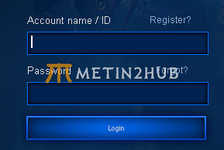
The login works, but when i press on "Start" after some time its kicking me into the login again.
I tried to add into the CONFIG BIND_IP = {MACHINE_IP} but it doesn't work, i get Can't assign requested address error
I researched on another topics and forums that it could be from src\config.cpp (if (!strncmp(netip, "999.999", 7)) // ignore if address is starting with 192), but it didn't helped at all. I even edited this in desc_client.cpp to see if there are any changes, but its

if (!bSentBoot)
{
bSentBoot = true;
network::GDOutputPacket<network::GDBootPacket> p;
p->set_ip("185.xxx.xxx.xxx");
DBPacket(p);
}

1753455604483.png
I 1753455615627.png
It stays blocked right there and then, boom disconnect.


I'm gonna provide you all the info, maybe someone have some knowledge about it.


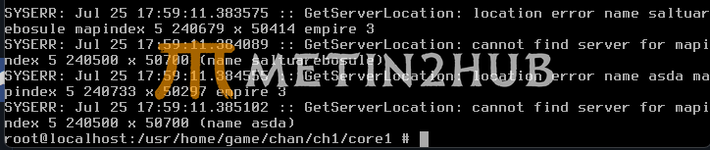
CH1/CORE SYSERR
1753455673615.png

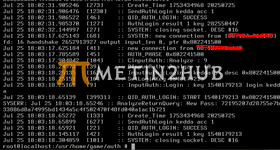
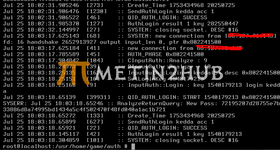
AUTH/SYSLOG
1753455865827.png

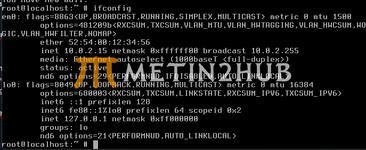
In my suspicion, I tend to believe it's due to the way the Docker image is virtualized on the network side, because it has an address in ifconfig starting with 10.x.
1753454563379.png


But at the same time, it doesn't make sense, because it's still open on those respective ports — otherwise, I wouldn't be receiving a response, I wouldn't be able to connect...

If you have any idea please come with an response, and thank you for your time.
 

Attachments

  • 1753455844446.png
    1753455844446.png
    149.3 KB · Views: 2
Metin2Hub Bot
M2Hub Bot
Feb
Threads
66
2,381
2
1,308
113
Hello. I have an weird problem with my server.
I installed an iso of freebsd on an docker container and i wanted to configure the source inside the freebsd docker.

The weird problem its next:
The login works, but when i press on "Start" after some time its kicking me into the login again.
I tried to add into the CONFIG BIND_IP = {MACHINE_IP} but it doesn't work, i get Can't assign requested address error
I researched on another topics and forums that it could be from src\config.cpp (if (!strncmp(netip, "999.999", 7)) // ignore if address is starting with 192), but it didn't helped at all. I even edited this in desc_client.cpp to see if there are any changes, but its

if (!bSentBoot)
{
bSentBoot = true;
network::GDOutputPacket<network::GDBootPacket> p;
p->set_ip("185.xxx.xxx.xxx");
DBPacket(p);
}

View attachment 2973
I View attachment 2974
It stays blocked right there and then, boom disconnect.


I'm gonna provide you all the info, maybe someone have some knowledge about it.


CH1/CORE SYSERR
View attachment 2975

AUTH/SYSLOG
View attachment 2977

In my suspicion, I tend to believe it's due to the way the Docker image is virtualized on the network side, because it has an address in ifconfig starting with 10.x.
View attachment 2972


But at the same time, it doesn't make sense, because it's still open on those respective ports — otherwise, I wouldn't be receiving a response, I wouldn't be able to connect...

If you have any idea please come with an response, and thank you for your time.

Hello dear user,

Your post will be under surveillance by bots for the next few hours.

Forum description : Metin2 private server, Metin2 download, Metin2 support, Metin2 Forum, Metin2 Pvp Servers, Errors, Bugs, Requests, Metin2 Pvp Forum, Everything About Metin2.
 
Discord Banner

🔥 Join us on Discord! - Active chat & direct support

We invite you to join the largest Metin2 community on Discord!

Join Now!
Member Count: 
Discord Robot
HUB Bot
Announcement
Member
Jun
Threads
0
34
3
8


What the logs tell us​


  1. Channel core log (GetServerLocation)
    GetServerLocation: location error name ...
    cannot find server for mapindex ...

    → This means your channel core cannot contact the DB/Game master to resolve map location. Usually, this happens when:
    • The CONFIG (DB / Auth / Channel) has the wrong IP/port mapping.
    • The server tries to connect to 185.xxx.xxx.xxx but inside Docker, it only has 10.0.2.15.
  2. Auth log
    AuthLogin result 1 key ...
    SYSTEM: closing socket. DESC #16

    → Auth accepts the login, then immediately closes the socket when it fails to hand over to the channel server.
    Again: usually an IP mismatch between Auth ↔ Channel.
  3. ifconfig
    em0: inet 10.0.2.15 netmask 0xffffff00

    → Your FreeBSD Docker only has 10.0.2.15 internally.
    It does not own 185.xxx.xxx.xxx (the external/public IP).
    So when the game core tries to bind or connect on 185.x, you get:
    Can't assign requested address


Why login → “Start” kicks back​


When you click Start, the client is redirected to the channel server.


  • The Auth server tells the client: "go to IP X on port Y".
  • If IP X = 185.xxx.xxx.xxx but your channel inside Docker is listening only on 10.0.2.15, then:
    • Auth thinks it’s OK (closes socket).
    • Client can’t connect → you’re kicked back to login.


Solutions​


You have two main options:


Option 1: Use internal bind (simplest in Docker)


  • In your CONFIG files (auth, db, channel):
    BIND_IP = 0.0.0.0

  • For P2P and PUBLIC_IP, use your host’s external IP (185.xxx...)
    For BIND_IP, always use 0.0.0.0 inside Docker.
  • Expose ports when running Docker:
    docker run -d --name metin2 \
    -p 13000:13000 \
    -p 13001:13001 \
    -p 13099:13099 \
    -p 11002:11002 \
    my-freebsd-image

  • This way:
    • Inside container → processes listen on all interfaces (0.0.0.0).
    • Outside → clients connect to 185.xxx.xxx.xxx.
    • Docker forwards ports to container.

Option 2: Run container with host networking


If your host is Linux, you can run:

docker run --network host ...


This gives the FreeBSD container direct access to host’s network stack, so it can bind to 185.xxx.xxx.xxx.
⚠️ But this doesn’t always work well with FreeBSD images in Docker.


Quick Test for you​


Inside the container, try:

sockstat -4 -l


This shows which IP:ports your cores are listening on.


  • If you see 10.0.2.15:13000 → client outside won’t reach it.
  • If you see 0.0.0.0:13000 → that’s correct, and Docker -p mapping will work.


My recommendation:


  • Change all BIND_IP to 0.0.0.0.
  • Make sure PUBLIC_IP is set to your real server IP (185.xxx).
  • Expose the right ports with -p.

That should fix the kick back to login.
 

Similar threads

AdBlock Detected

We get it, advertisements are annoying!

Sure, ad-blocking software does a great job at blocking ads, but it also blocks useful features of our website. For the best site experience please disable your AdBlocker.

I've Disabled AdBlock