Thread Author
Main programs needed to
develop or edit a server:
develop or edit a server:
- SSH PuTTY:
- WinSCP:
- Navicat Premium 16.2.5:
- Notepad++:
- Paint.NET:
- Visual Studio 2013/2019/2022:
To see the download links,
Log in or register now.
- WinSCP:
To see the download links,
Log in or register now.
- Navicat Premium 16.2.5:
To see the download links,
Log in or register now.
- Notepad++:
To see the download links,
Log in or register now.
- Paint.NET:
To see the download links,
Log in or register now.
- Visual Studio 2013/2019/2022:
To see the download links,
Log in or register now.
Let's start the explanation of each program and what it is used for
in a more beginner's mode to understand the basics.
SSH PuTTY:
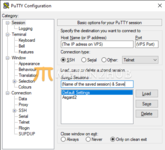
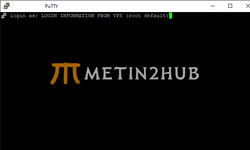
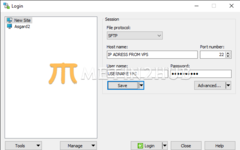
Once you have entered your username press enter and you will be prompted to enter your password, you will enter the password from the host.
To put the password copy it with CTRL+C and put it with right click in the putty console (the password will not appear, but press enter directly).
Now that you are inside the putty console, there are a lot of commands to execute, but I will list the most basic ones to run a server already installed in winscp.
(This tutorial will be next, about how to upload archives in winscp, and how to archive, unarchive and backup)
TO START THE SERVER:
cd usr/home/game && sh start.sh
TO STOP THE SERVER:
cd usr/home/game && sh close.sh
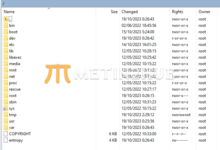
(you have to choose the path where the "start.sh" or "close.sh" file is in), you'll have an example on winscp tutorial.
cd usr/home/game && sh start.sh
TO STOP THE SERVER:
cd usr/home/game && sh close.sh
(you have to choose the path where the "start.sh" or "close.sh" file is in), you'll have an example on winscp tutorial.
RESET MYSQL PASSWORD:
Stop mysql server:
/usr/local/etc/rc.d/mysql-server stop
Start mysql server without root password:
mysqld_safe --skip-grant-tables &
We connect as root to the mysql server:
mysql -u root
Run the following commands, which will reset the root password:
use mysql;
update user set password=PASSWORD("HERE YOU PUT THE NEW PASSWORD") where User='root';
flush privileges;
quit
/usr/local/etc/rc.d/mysql-server stop
/usr/local/etc/rc.d/mysql-server start
reboot
DONE.
Now the password to the database with the name "root" has been reset with the password you put above.
We are waiting for the server to start up and we'll get started!
Stop mysql server:
/usr/local/etc/rc.d/mysql-server stop
Start mysql server without root password:
mysqld_safe --skip-grant-tables &
We connect as root to the mysql server:
mysql -u root
Run the following commands, which will reset the root password:
use mysql;
update user set password=PASSWORD("HERE YOU PUT THE NEW PASSWORD") where User='root';
flush privileges;
quit
/usr/local/etc/rc.d/mysql-server stop
/usr/local/etc/rc.d/mysql-server start
reboot
DONE.
Now the password to the database with the name "root" has been reset with the password you put above.
We are waiting for the server to start up and we'll get started!
In this publication I will post in the next few days new updates and continuations on how to use the programs, installations,
compilations, and many other details for beginners.
With this publication I wanted you to understand on what concept this tutorial will be created,
it will be closed so that everything will be organized and beginners can learn easily.
This is not a tutorial for advanced users!