Ciao, sono DoN e oggi ti mostrerò come installare World Editor!
Devi solo seguire tutti i passaggi!
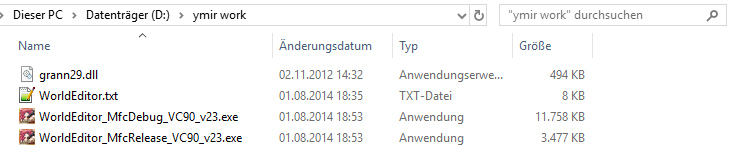
- 1: Scarica WorldEditor ReMIX: [Contenuto nascosto] questo è di Marty Sama
- 2: Crea sul tuo disco D:\ una cartella chiamata " ymir work " e posiziona lì i file di download. (Questo passaggio è importante)
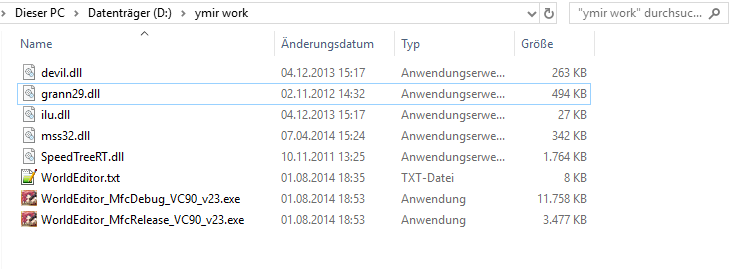
- 3: Copia i seguenti file dal tuo client nella cartella "ymir work":
- 3.1: Dovrebbe apparire così:
- 4: Decomprimi i seguenti file dal tuo client e mettili nella cartella "ymir work":
- 4.1: Se decomprimi i file, assicurati di scegliere la cartella giusta!
Esempio:
pack\effect\ymir work\ effect
- 4.2: Dovrebbe apparire così:
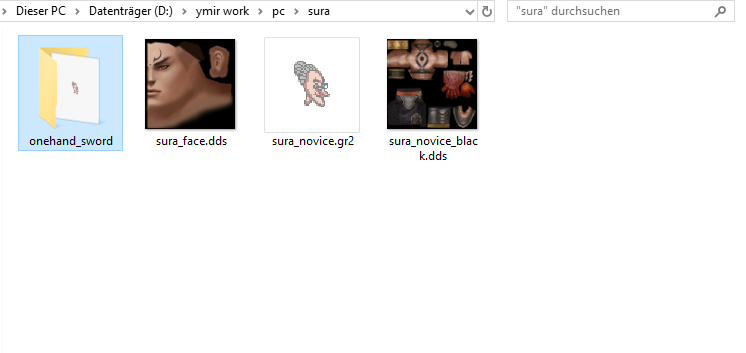
- 5: Se vuoi vedere il tuo personaggio nel WorldEditor aggiungi le seguenti cose.
- 5.1: Dovrebbe apparire così:
Fatto, ora basta eseguire "WorldEditorRemix_MfcDebug_v44.exe"! Presto pubblicherò un video su come modificare le mappe con World Editor!
quindi restate su https://metin2hub.com/ per saperne di più!!!!
Hello, i'm DoN , and today i'll show you How do I install world editor!
You just need to follow all the steps!
- 1: Download the WorldEditor ReMIX: [Hidden content] this is from Marty Sama
- 2: Create on your D:\ Drive a folder named "ymir work" and place the Download files there. (This step is important)
- 3: Copy the following files from your client in the "ymir work" folder:
- 3.1: It should look like that:
- 4: Unpack the following files from your client and put it in your "ymir work" folder:
- 4.1: If you unpack the files, be sure that you take the right folder!
Example:
pack\effect\ymir work\effect
- 4.2: It should look like that:
- 5: If you want to see your character in the WorldEditor add following things.
- 5.1: It should look like that:
All done now just run "WorldEditorRemix_MfcDebug_v44.exe" ! I will soon post a video on how to edit maps with World Editor!
so stay on https://metin2hub.com/ for more !!!!
This site uses cookies to help personalise content, tailor your experience and to keep you logged in if you register.
By continuing to use this site, you are consenting to our use of cookies.