
niceHola, soy DoN y hoy te mostraré cómo instalo World Editor.
¡Solo necesitas seguir todos los pasos!
- 1: Descargue WorldEditor ReMIX: [Contenido oculto] esto es de Marty Sama
- 2: Cree en su D:\ Drive una carpeta llamada " ymir work " y coloque los archivos de descarga allí. (Este paso es importante)
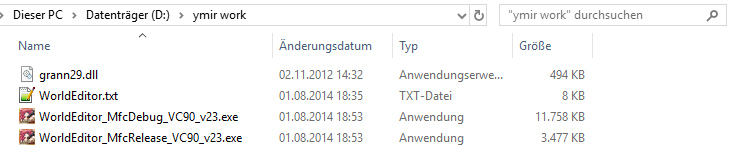
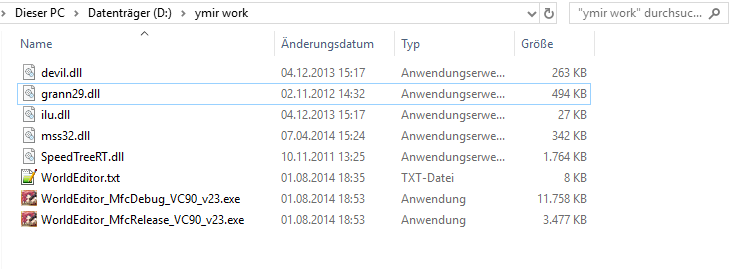
- 3: Copie los siguientes archivos de su cliente en la carpeta "ymir work":
- 3.1: Debería verse así:
- 4: Descomprime los siguientes archivos de tu cliente y colócalos en tu carpeta "ymir work":
- 4.1: Si descomprimes los archivos, ¡asegúrate de tomar la carpeta correcta!
Ejemplo:
paquete\efecto\ymir trabajo\ efecto
- 4.2: Debería verse así:

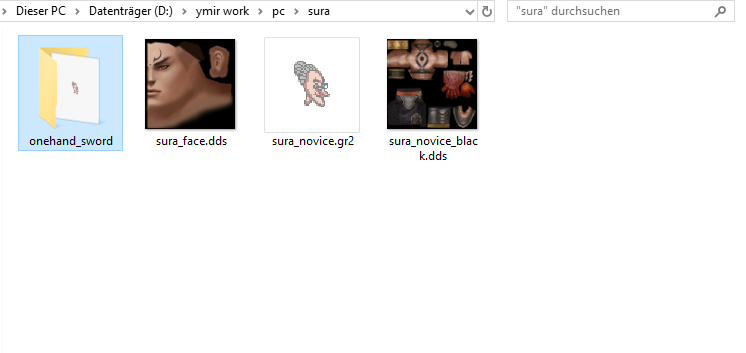
- 5: Si quieres ver a tu personaje en el WorldEditor, agrega las siguientes cosas.
- 5.1: Debería verse así:
¡Todo listo ahora simplemente ejecute "WorldEditorRemix_MfcDebug_v44.exe"! ¡Pronto publicaré un vídeo sobre cómo editar mapas con World Editor!
¡¡¡Así que quédate en https://metin2hub.com/ para obtener más información !!!!
-
Hello Guest ⚔️ Ready to step up? We're recruiting active Moderators to join our team! Join the Team 💎
-
🎉 Hey there! I've just launched my brand new server voting platform Metin2 P Servers 🚀
[Program & HowTo] World Editor by MartySama
- Thread starter DoN
- Start date
-
- Tags
- world editor

Similar threads
- Question


