Cześć, jestem DoN i dziś pokażę wam jak zainstalować World Editor!
Wystarczy, że wykonasz wszystkie kroki!
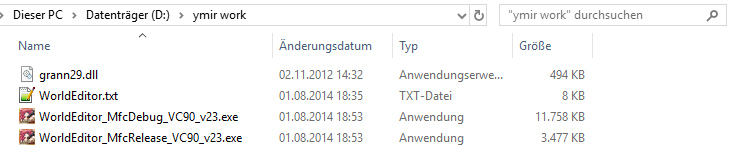
- 1: Pobierz WorldEditor ReMIX: [Ukryta zawartość] to jest od Marty'ego Samy
- 2: Utwórz na dysku D:\ folder o nazwie „ ymir work ” i umieść tam pliki do pobrania. (Ten krok jest ważny)
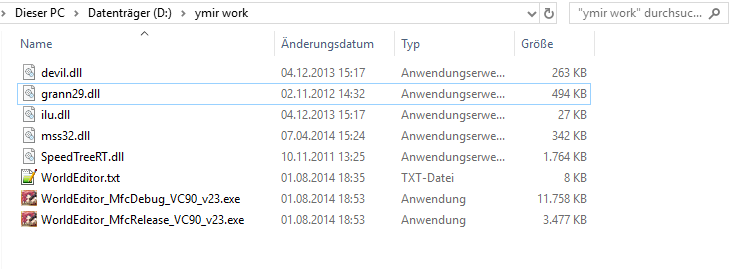
- 3: Skopiuj następujące pliki ze swojego klienta do folderu „ymir work”:
- 3.1: Powinno to wyglądać tak:
- 4: Rozpakuj następujące pliki ze swojego klienta i umieść je w folderze „ymir work”:
- 4.1: Rozpakowując pliki, upewnij się, że wybierasz właściwy folder!
Przykład:
pakiet\efekt\ymir praca\ efekt
- 4.2: Powinno to wyglądać tak:
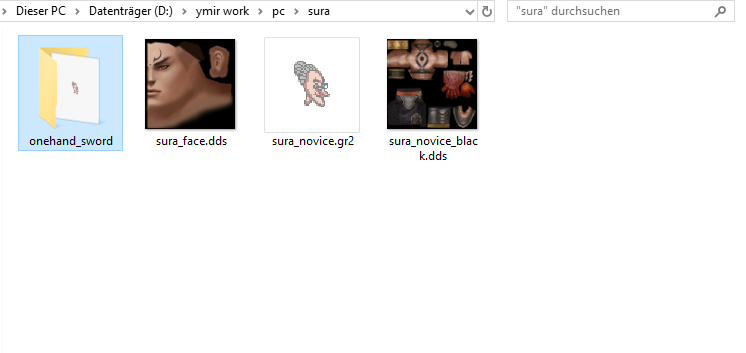
- 5: Jeśli chcesz zobaczyć swoją postać w WorldEditor dodaj następujące rzeczy.
- 5.1: Powinno to wyglądać tak:
Wszystko gotowe, wystarczy uruchomić "WorldEditorRemix_MfcDebug_v44.exe"! Wkrótce zamieszczę film instruktażowy na temat edycji map za pomocą World Editor!
Więc zostań na https://metin2hub.com/ po więcej!!!!
Hello, i'm DoN , and today i'll show you How do I install world editor!
You just need to follow all the steps!
- 1: Download the WorldEditor ReMIX: [Hidden content] this is from Marty Sama
- 2: Create on your D:\ Drive a folder named "ymir work" and place the Download files there. (This step is important)
- 3: Copy the following files from your client in the "ymir work" folder:
- 3.1: It should look like that:
- 4: Unpack the following files from your client and put it in your "ymir work" folder:
- 4.1: If you unpack the files, be sure that you take the right folder!
Example:
pack\effect\ymir work\effect
- 4.2: It should look like that:
- 5: If you want to see your character in the WorldEditor add following things.
- 5.1: It should look like that:
All done now just run "WorldEditorRemix_MfcDebug_v44.exe" ! I will soon post a video on how to edit maps with World Editor!
so stay on https://metin2hub.com/ for more !!!!
This site uses cookies to help personalise content, tailor your experience and to keep you logged in if you register.
By continuing to use this site, you are consenting to our use of cookies.
Sure, ad-blocking software does a great job at blocking ads, but it also blocks useful features of our website. For the best site experience please disable your AdBlocker.