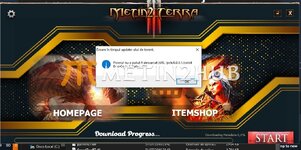
Autopatcher with PSD [Full]

Member
Mar
Threads
0
20
0
1
Rating - 0%
0   0   0
photoshop.png

Screenshot-9.png

Here is autopatcher with PSD so you can make it as you like
it's easy to design as you like and also easy to install

*Here is how to install*

*First go in ''pch'' folder and edit ''metin2torrent.config.xml'' with your website details
*Upload ''pch'' Folder to your website host
*After go in ''Autopatcher compiler/metin2launch'' folder and edit ''TorrentPatch.url.xml'' and TorrentPatch.locale.xml''
*then when you done go in "Autopatcher compiler" folder and run "Make EXE.bat" and will apear one exe file named "Patcher.exe" that's your Autopatcher
* The folder named "Pack Creator" is where you will create the update files [.lz]
All Done


I hope this little tutorial will help you ... I apologize if there are any mistakes!
At the moment the Autopatcher is in Romanian language but can be easly translated "TorrentPatch.locale.xml"

If you like it please leave like :) , thank for looking
[̲̅D][̲̅o][̲̅N]

[Hidden content]
thx
 
Member
Oct
Threads
0
62
1
8
Rating - 0%
0   0   0
photoshop.png

Screenshot-9.png

Here is autopatcher with PSD so you can make it as you like
it's easy to design as you like and also easy to install

*Here is how to install*

*First go in ''pch'' folder and edit ''metin2torrent.config.xml'' with your website details
*Upload ''pch'' Folder to your website host
*After go in ''Autopatcher compiler/metin2launch'' folder and edit ''TorrentPatch.url.xml'' and TorrentPatch.locale.xml''
*then when you done go in "Autopatcher compiler" folder and run "Make EXE.bat" and will apear one exe file named "Patcher.exe" that's your Autopatcher
* The folder named "Pack Creator" is where you will create the update files [.lz]
All Done


I hope this little tutorial will help you ... I apologize if there are any mistakes!
At the moment the Autopatcher is in Romanian language but can be easly translated "TorrentPatch.locale.xml"

If you like it please leave like , thank for looking:)
[̲̅D][̲̅o][̲̅N]

[Hidden content]
ty bro
 
Member
Oct
Threads
0
62
1
8
Rating - 0%
0   0   0

WhatsApp Image 2025-03-29 at 12.04.44.jpeg

Can someone help me resolve this error?
I don't know if I need to upload the files and if I do, where should I put them?
 
Member
May
Threads
0
28
0
1
Rating - 0%
0   0   0
photoshop.png

Screenshot-9.png

Here is autopatcher with PSD so you can make it as you like
it's easy to design as you like and also easy to install

*Here is how to install*

*First go in ''pch'' folder and edit ''metin2torrent.config.xml'' with your website details
*Upload ''pch'' Folder to your website host
*After go in ''Autopatcher compiler/metin2launch'' folder and edit ''TorrentPatch.url.xml'' and TorrentPatch.locale.xml''
*then when you done go in "Autopatcher compiler" folder and run "Make EXE.bat" and will apear one exe file named "Patcher.exe" that's your Autopatcher
* The folder named "Pack Creator" is where you will create the update files [.lz]
All Done


I hope this little tutorial will help you ... I apologize if there are any mistakes!
At the moment the Autopatcher is in Romanian language but can be easly translated "TorrentPatch.locale.xml"

If you like it please leave like :) , thank for looking
[̲̅D][̲̅o][̲̅N]

[Hidden content]
ty dude
 
AdBlock Detected

We get it, advertisements are annoying!

Sure, ad-blocking software does a great job at blocking ads, but it also blocks useful features of our website. For the best site experience please disable your AdBlocker.

I've Disabled AdBlock