

What is it?
A drag-and-drop tool to create Metin2 quests visually.
No Lua knowledge needed.
Drag blocks, configure values, copy the generated code.
Done.
Currently in BETA v0.1.0
How It Works
1. Drag blocks from the toolbox to the canvas
2. Configure each block (mob VNUMs, items, dialogues...)
3. Copy the generated Lua code to your quest file
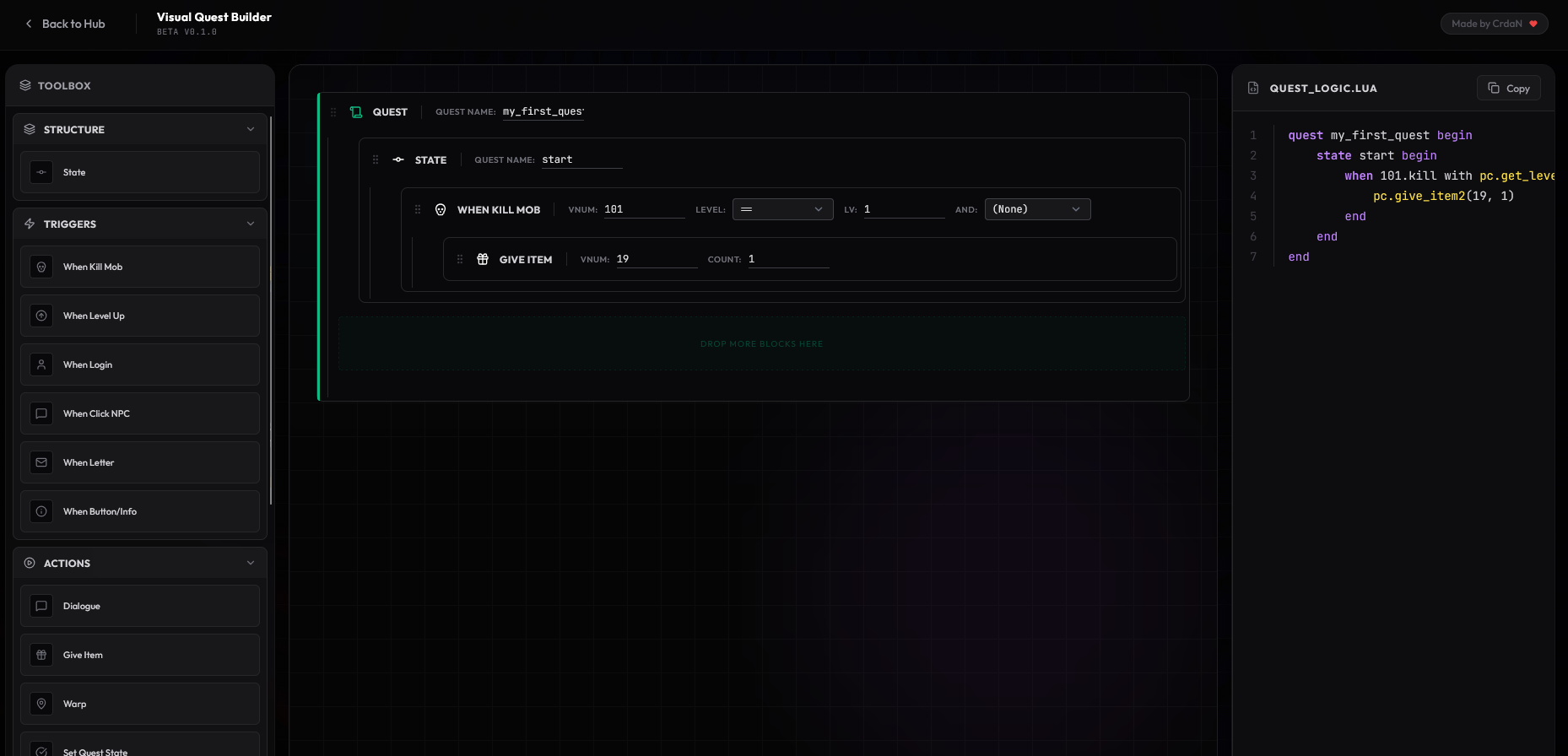
Available Blocks
Structure
- quest_start - Main quest wrapper
- state - Quest phase container
Triggers (When...)
- when_kill - Player kills a mob
- when_levelup - Player levels up
- when_login - Player logs in
- when_click_npc - Player clicks NPC
- when_letter - Player opens quest letter
- when_button - Player clicks dialog button
Action
- say - Display NPC dialogue
- give_item - Give item reward
- warp - Teleport player
- set_state - Change quest state
- setqf / incqf - Set or increment quest flags
- send_letter - Send quest notification
- set_counter - Display progress counter
- clear_letter - Remove notification
- wait - Continue dialog
Logic
- if_condition - Check condition
- elseif - Alternative condition
- else - Fallback
50+ Conditions
Supported Player stats, inventory checks, quest flags, GM status, guild, marriage, horse, party, map location, time, and more.
Quick Filters on Triggers One-click filters:
Job, Empire, Gender, Skill Group, GM status, Marriage.
Features
- Drag & drop interface
- Nested block logic
- Real-time Lua preview
- Syntax highlighting
- One-click copy
- Works in browser
BETA Notice
Core features are stable. More blocks coming based on feedback. Report bugs to help improve the tool.
Questions or feedback? Feel free to answer here
A drag-and-drop tool to create Metin2 quests visually.
No Lua knowledge needed.
Drag blocks, configure values, copy the generated code.
Done.
Currently in BETA v0.1.0
How It Works
1. Drag blocks from the toolbox to the canvas
2. Configure each block (mob VNUMs, items, dialogues...)
3. Copy the generated Lua code to your quest file
Available Blocks
Structure
- quest_start - Main quest wrapper
- state - Quest phase container
Triggers (When...)
- when_kill - Player kills a mob
- when_levelup - Player levels up
- when_login - Player logs in
- when_click_npc - Player clicks NPC
- when_letter - Player opens quest letter
- when_button - Player clicks dialog button
Action
- say - Display NPC dialogue
- give_item - Give item reward
- warp - Teleport player
- set_state - Change quest state
- setqf / incqf - Set or increment quest flags
- send_letter - Send quest notification
- set_counter - Display progress counter
- clear_letter - Remove notification
- wait - Continue dialog
Logic
- if_condition - Check condition
- elseif - Alternative condition
- else - Fallback
50+ Conditions
Supported Player stats, inventory checks, quest flags, GM status, guild, marriage, horse, party, map location, time, and more.
Quick Filters on Triggers One-click filters:
Job, Empire, Gender, Skill Group, GM status, Marriage.
Features
- Drag & drop interface
- Nested block logic
- Real-time Lua preview
- Syntax highlighting
- One-click copy
- Works in browser
BETA Notice
Core features are stable. More blocks coming based on feedback. Report bugs to help improve the tool.
Questions or feedback? Feel free to answer here
Last edited by a moderator:


